
CHICAGO, Ill. — Summer is right around the corner, and you’re reading this saying to yourself – you’re ready to book that next flight.
I’m sure you’ve heard of Google Flights and probably have used it before. But, I’d like to give you a few tricks and hacks you can use to plan your next trip.
Use the filter options the right way
Google Flights gives you many options to filter how you want to travel when you want to travel, what airline you want to travel on, and so much more. Using these features to make your search work for you is essential.
It’s critical to know the “Big 3” airlines fall under the following umbrellas: Oneworld (American Airlines and its partners), Star Alliance (United and its partners), and SkyTeam (Delta and its partners). It’s also worth noting Southwest Airlines isn’t available on Google Flights. However, other budget carriers like Spirit and Frontier are.
Filtering out which airline you’d prefer to fly is vital to manipulate your search to show the preferences you care about. For example, I’m an American Airlines guy—I love them to a fault, for better or for worse. If I want to fly to Cancun, I’ll click the airlines tab below (it’s now showing Oneworld because I clicked that already), and it’ll show all Oneworld flights, which in this case are American Airlines and Alaska Airlines.
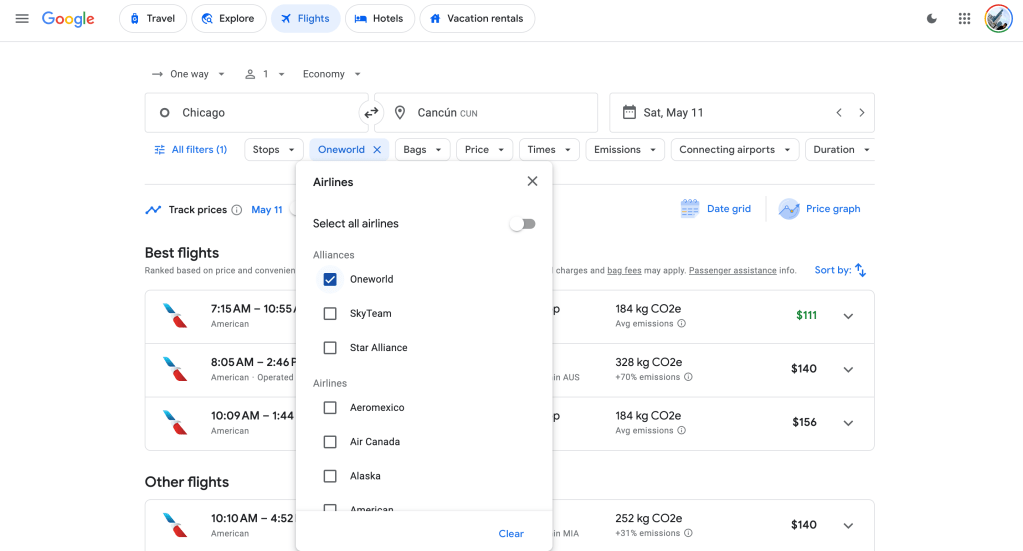
Now, let’s discuss all these other filtering tools. Below, you’ll see the stops tab. This button filters between nonstop flights or flights with a stop or two. You can use both functions simultaneously if you’re trying to go somewhere nonstop on a particular airline.
The next tab says bags. This filter will help you determine which airlines charge for carry-on bags and which don’t. It’ll also help you learn how much it costs to check a bag on a particular carrier.
Say you want to go somewhere, but you’d like to stay in a specific price range – there’s a tab for that. The price tab allows you to slide to the maximum price you’d like to pay and filter flights for that cost -one of my favorite tabs for spontaneous trips. We’ll discuss that more later on in this piece.
The last tab you should know about would be times. If you know you’ll work during the day and can only leave after a specific time or would like to return by a particular time; the time tab will assist with this.

The cool thing about these tabs is that you can use all of them at the same time. Let’s try it out together. I want to go to Atlanta with my girlfriend on the weekend of June 21 and come back Sunday, June 23. I work 9-5 and would take my lunch at 4 p.m., and O’Hare, with traffic, is about 70 minutes from my house. I prefer to return at midday Sunday to take my son to the park. Also, I only want to fly on American, BUT I’d do Delta since Atlanta is a Delta city. Lastly, checked bags aren’t an issue for me – however, I don’t want to spend more than $300 on a roundtrip flight.
In this scenario, I’m using all the tabs I’ve covered. See the results below.

You may wonder – why this is important – well, when searching, you’d like to get right to what you’re looking for vs. a general search like the picture below without the filters. Instead of getting my hopes up about the $108 flight on Frontier – I can search within my filters and not look at flights at times that aren’t going to work for me. You can use the tool at the top to price roundtrip tickets for more than one person – so these flights are per person.

Fly anywhere and stay within your budget
Sometimes, I like to look at the computer and say – dang, where can I go this weekend? That’s not too crazy expensive. Google Flights allows you to look at destinations worldwide and use the various tabs to work in your favor.
So, say I’d like to go somewhere this weekend to celebrate Mother’s Day, and I don’t want to spend over $650 for my mom and me—and we’re open to going anywhere. We can use all these tabs I told you about to find a trip. Let’s see what we find.
Well, we can’t fly anywhere on American Airlines in the Lower 48 for less than 650 roundtrip, but if she had a passport, we could have jetted out to Cancun!

Let Google Flights pick your next trip
For my people who are very spontaneous and would like to go anywhere but are still determining exactly when but might have a timeframe in mind – and this can work even if you don’t – allow Google Flights to do its magic.
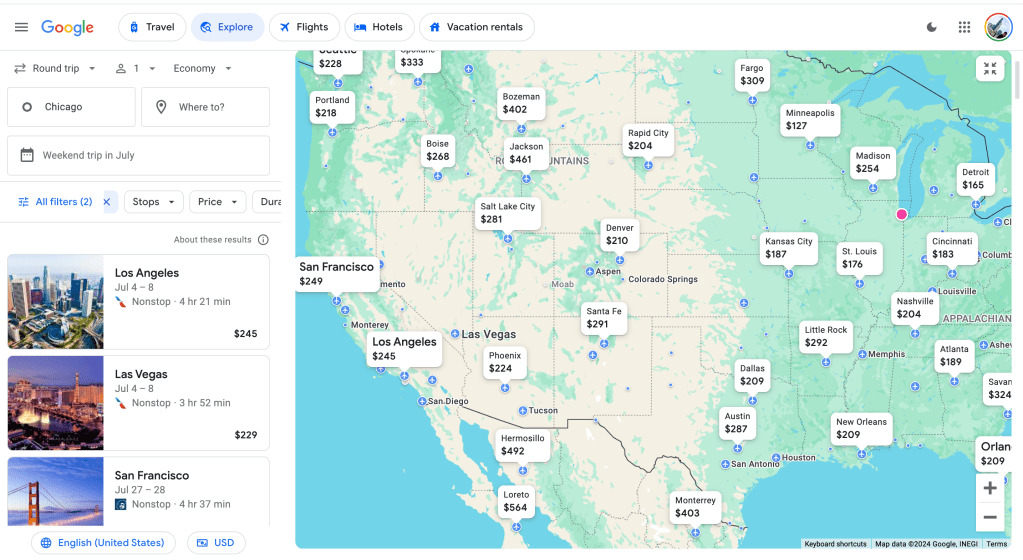
When you first visit the website, the origin (where you are) is typically selected. From there, click either one-way or roundtrip (I selected roundtrip) and click explore. This option will give you the best prices across the globe within the next six months. But you can modify the search, click weekends, or play with the pricing tab and allow Google to find you a trip.
For this example, I will say I want to fly American (Oneworld) on the weekend—I don’t know what weekend—but I know I want to go sometime in July. I’m not going to worry about the pricing point at this time. Let’s see what we find.
Google Flights shows the roundtrip fare to all destinations for various weekends. So if I wanted to do L.A. or Vegas for the Independence Day weekend – I could do so on American for $245. This tool is excellent for travelers who wish to take the guessing work out of planning a trip.
Finding a good deal
Often, Southwest Airlines floods the market with its $39 flight sale, which can cause other carriers to lower their fares. You won’t see those Southwest flights on Google Flights. However, I’d say download the Southwest app and allow it to give you push notifications. When they’re having a great sale, come to Google Flights later that day to see if the other carriers are selling flights at a similar rate.
Doing so will allow you to search whether you’d like to fly with Southwest or choose another carrier. The goal here is saving – doing this hack (well, it’s not a hack, but the cool kids say that, so I’ll say it) will help you plan a trip on a budget.








 Let's Take a Day Trip
Leave a reply to Southwest Airlines’ Fares Are Available on Google Flights – Let's Take a Trip Cancel reply